



Consistent Units in Abaqus: The Ultimate Guide to SI & Density Units
For beginners or even experienced Abaqus users, sometimes the question arises:
What unit system is used in Abaqus?
How to convert units in Abaqus?
How to check the unit system in Abaqus?
And questions like this. In this post, we will explain the consistent units in Abaqus from A to Z! It is important to know which unit system is used in impact or static analysis.
The importance of the topic – to learn from mistakes
Consistent units are very important in engineering design and simulation, and it is interesting to know that negligence will lead to disastrous consequences. Do you doubt it? Take a look at this engineering mistake in converting the English system to metric in NASA’s Mars Climate Orbiter project.
The Mars Climate Orbiter was lost due to a navigation error caused by a mismatch between the English units used by one team and the metric units used by another team. This resulted in incorrect trajectory calculations and ultimately caused the spacecraft to burn up in Mars’ atmosphere.

So, let’s learn about consistent units in Abaqus so that such tragedies do not happen in our name!
What unit system is used in Abaqus?
Unlike CAD software, Abaqus does not have a built-in unit system. It is a completely unitless finite element solver. This means the user is strictly responsible for maintaining consistent units across all input data, including geometry, material properties, and loads.
As a golden rule: the units of derived quantities (such as stress, pressure, and energy) are entirely dictated by the base units you choose for Length, Mass, and Time. For example, if your geometry is in millimeters (mm) and your applied force is in Newtons (N), your resulting stress will automatically be in MegaPascals (MPa), and your material density must be entered in tonnes per cubic millimeter (t/mm³).
Value of units
With a little care, we can say that the units that have more value are larger. For example, the value of the MPa unit for pressure is 10.6 times the Pa unit. The question may arise: if the units are based on mm in an analysis, will the unit of pressure be MPa? If the unit of force is Newton, the answer is yes.
Is it possible to select the unit of mass and time in such a way that the force is obtained based on the same force?
The answer is yes. I have explained below.
Abaqus Consistent units
If the unit of time is seconds and the unit of length is millimeters, what unit must be chosen for the mass so that the force is the same as Newtons?
Mass and force
To do this, you must do the following. If X is a new unit of mass and its relative value is compared to kilograms (X = a Kg):
N = (a Kg) mm/s^2 = (a Kg) 10e-3 m/s^2 = (10e-3 (a) (Kg.m/s^2) = (10e-3 a)(N)
The quantity (10 e-3 a) must be equal to one to obtain the force in newtons. Therefore, the new unit of mass in this case should be 1000 kg or one ton.
Density
Because Abaqus usually works with density, for a material such as steel, the density must be entered in tons per cubic millimeter.
7800 Kg/m^3 = 7800 . 10^-3 ton/10^9 mm^3 = (7800). 10^-12 ton/mm^3
Poor selection of consistent units sometimes causes problems for the finite element analyst. Consider the following example.
Example
If the mass is in kilograms and the length is in millimeters, the unit of time b seconds can be obtained in such a way that the force is obtained in Newtons:
Force (Newton)=Kg (mm)/(b.s)^2 =Kg (10^(-3) m)/(b.s)^2 =Kg.m/s^2 .10^(-3)/b^2 =10^(-3)/b^2 N
10^(-3) = b^2 ==> b=1/(10√10)
That is, in this consistent but unsuitable unit system, the unit of time will be 1/(10√10).
10^10 sec => 3000 year => Time Unit
10^9 Ton => 10^12 Kg => Mass Unit
If the meter unit is selected for length, the necessary operations can be easily performed to identify the force unit.
F = 10^12 Kg . m/((10^10 )^2 s^2 ) = 10^12/10^20 Kg.m/s^2 = 10^(-8) N
Another widely used consistent unit system in Abaqus
The cm.g.micro s unit system is another unit system commonly used for impact and explosion analysis. In the case of impact due to the application of high forces in a short time, this system will be a very suitable compatible unit. If other units such as kilograms, meters, and seconds are used, there is a possibility of error due to rounding numbers with a high number of decimals (per unit time).
What is the difference between the SI-m and SI-mm system?
Standard Abaqus Consistent Units Table
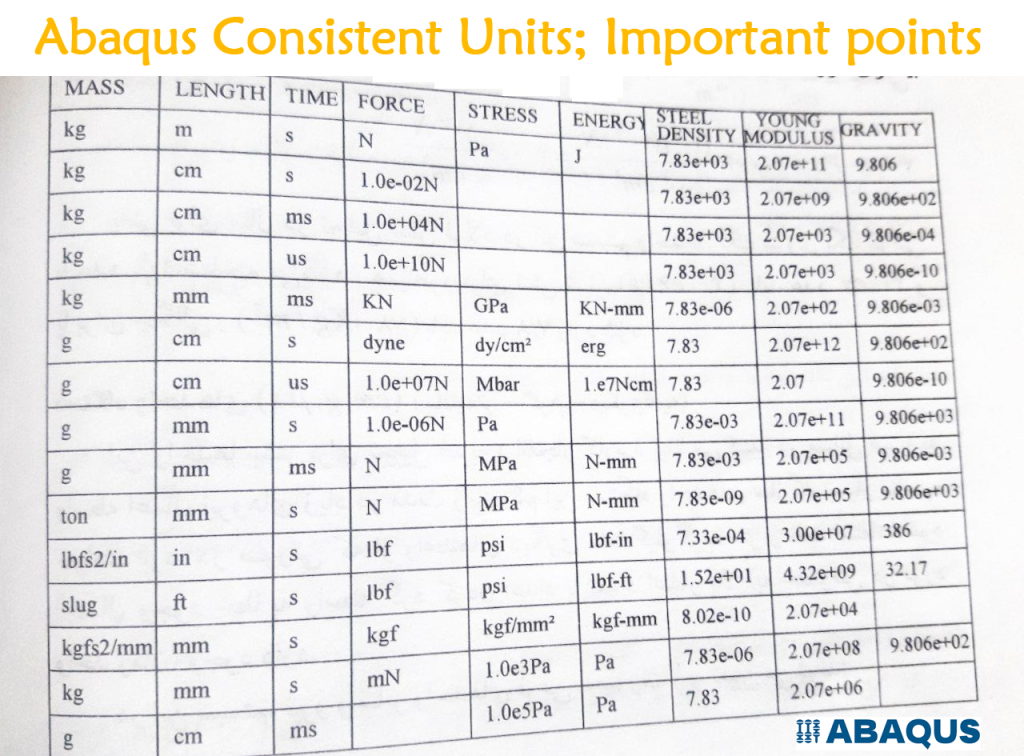
(Pro Tip for Explicit Dynamics: Always verify your density units! A common mistake is using kg/m³ while the geometry is in millimeters. This will fatally alter your stable time increment and mass scaling.)
Stop Ruining Your Non-Linear Analysis with Bad Unit Conversions
One of the most frustrating tasks in FEA is converting engineering stress-strain data from lab testing machines into the True Plastic Stress-Strain format required by Abaqus. A single unit conversion error (e.g., mixing Pascals with MegaPascals) will cause your plastic deformation simulation to crash immediately or yield catastrophic stress results.
Instead of wasting hours on Excel spreadsheets and manual unit conversions, automate the entire process with the Plastic Curve Generator Plugin. Designed by BanuMusa R&D, this Abaqus GUI plugin automatically ingests your raw tensile test data, handles all unit consistencies, calculates the true plastic strain, and feeds it directly into your Abaqus material property tree with one click.
🎓 Attention MSc & PhD Researchers: Are you calibrating materials for your thesis? Verify your academic status today and get a 40% Academic Discount on the Plastic Curve Generator and our entire simulation toolkit. Click here to request your academic discount!
Online Abaqus Unit Converter
Carl Osterwisch has made things a lot easier. You can convert different dimensions to different unit systems much more easily and faster online. Just click on this link:
https://msgfile.info/fea-units.html
Abaqus Units Converter Plugin
To convert units, there is an Abaqus plugin that is not complete. Of course, if you have Python scripting skills, you can develop it yourself. You can get this plugin from here.
14 Essentially Abaqus Plugins (Add-ons) for Abaqus users – Part I
References
- One of the most complete references (total of 5 pages!) for unit conversion prepared by ESI Group for PAM-CRASH software, and you can use it for all CAE software. Download
- LS-Dyna consistent units table – The most popular reference among simulation engineers!
Frequently Asked Questions (FAQ)
What is the standard Abaqus unit system?
Abaqus does not have a default or standard unit system. It is completely dimensionless. The user must decide on a consistent set of units (such as SI-m or SI-mm) and apply it uniformly across geometry, material properties, and boundary conditions.
How do I input density in Abaqus using SI-mm?
If your length unit is millimeters (mm) and force is in Newtons (N), your mass unit must be in tonnes. For example, water density is 1000 kg/m³, which must be entered as 1e-9 tonne/mm³ in Abaqus.
Does Abaqus have a built-in material library?
No, standard Abaqus does not include a pre-installed material library. Users must input material parameters manually or use third-party plugins like MatLib to import validated material data automatically.
Accelerate Your Engineering Projects with BanuMusa R&D
Struggling with complex simulations, material calibration, or convergence issues? We provide professional solutions to guarantee your R&D success:
- 🚀 FEA & CFD Consultancy: Outsource your toughest structural, thermal, and fluid dynamics challenges to our industry experts.
- 🎓 Technical Abaqus Mentoring: Get 1-on-1 professional guidance to overcome specific modeling bottlenecks and save weeks of trial and error.
- 📚 Abaqus Material Library (MatLib): Skip manual mathematical calibration. Download hundreds of scientifically validated material models instantly.