


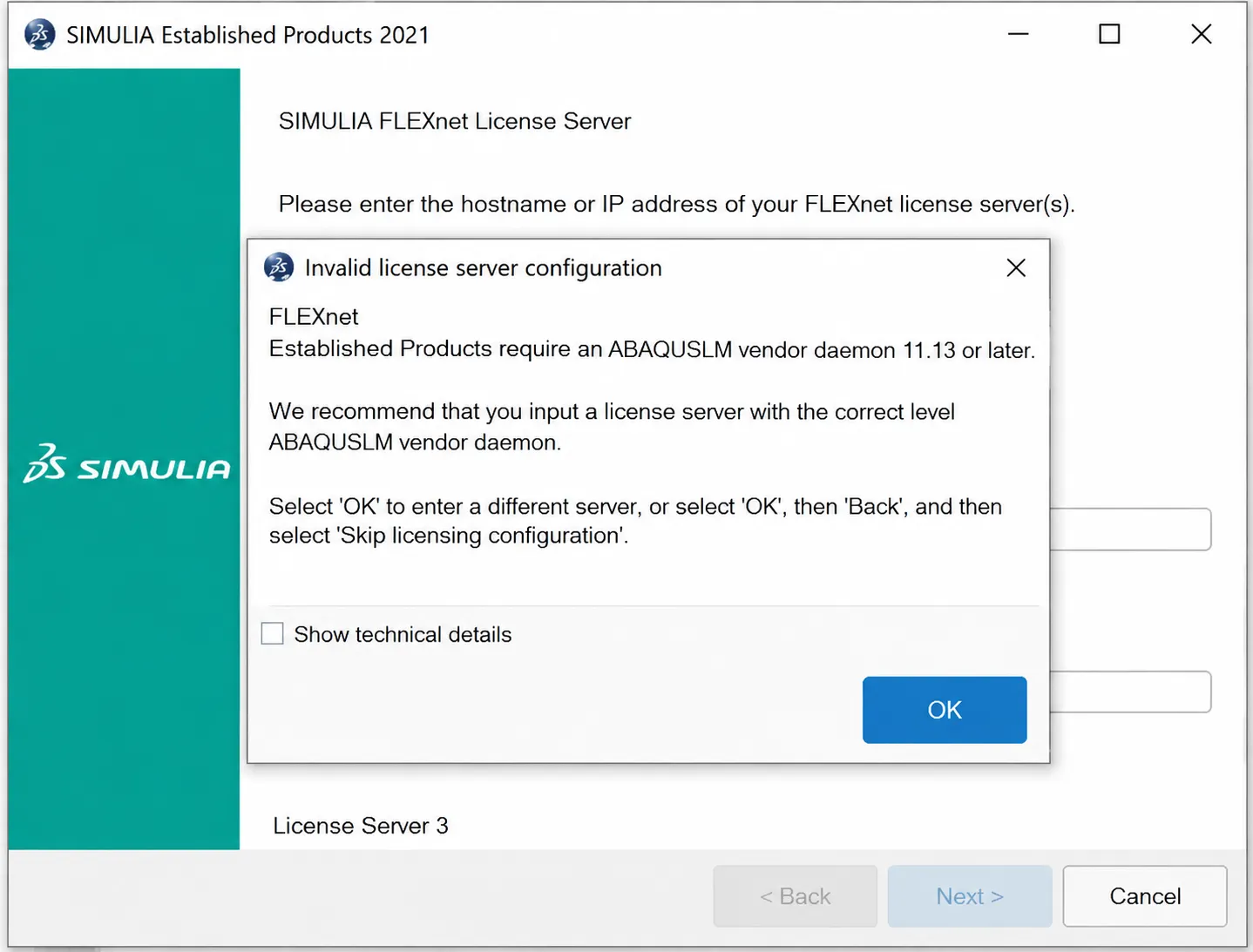
How to Fix Abaqus FlexNet License Server Errors (FLEXlm Fix)
The “Invalid license server configuration” error is a common roadblock when installing modern versions of SIMULIA Abaqus (such as Abaqus 2019, 2020, 2021, 2022, and beyond). While older versions (6.12 to 6.14) rarely encountered this, modern local license management systems require stricter network and environment configurations.
If you are facing the Abaqus FLEX net License Server issue, follow this definitive 5-step troubleshooting guide to resolve the error and successfully launch your software.
How To Fix the Flex Net Licensing Error?
Step 1: Edit System Environment Variables
A missing or incorrectly typed environment variable is the primary cause of this error. Before starting the Abaqus installation, open your Windows Environment Variables and create a new System Variable. Ensure the variable name (e.g., ABAQUSLM_LICENSE_FILE or NOLICENSECHECK) and its corresponding value match your installation documentation exactly. Case sensitivity matters.
Step 2: Run All Executables as Administrator
The Flex Net server requires administrative privileges to modify Windows Registry keys and network firewall rules. Always right-click on the installation files and the license server executables (like lmgrd.exe) and select “Run as administrator”. Missing this simple step guarantees a failure.
Step 3: Temporarily Disable Windows Antivirus
When extracting local license manager files from a compressed archive (RAR/ZIP), Windows Defender or third-party antivirus software often falsely identifies the server executables as malware. If these files are quarantined or deleted automatically, the Abaqus FLEX net License Server cannot initialize. Completely disable real-time protection before extraction and installation.
Step 4: Purge Previous License Folders completely
If you previously failed to install Abaqus or are upgrading from an older version, residual license files create severe process interference. You must navigate to your installation directory (e.g., C:\SIMULIA\License) and completely delete the previous license folder before attempting to rebuild and reinstall the Flex Net server.
Step 5: Verify the License Server Port Address
Ensure that the address of the license server queried by Abaqus matches the exact address inside your .lic file. Open the license file using Notepad and check the top line. If the file designates 27800@localhost (or 27011@localhost), your installation prompt must match this port number exactly.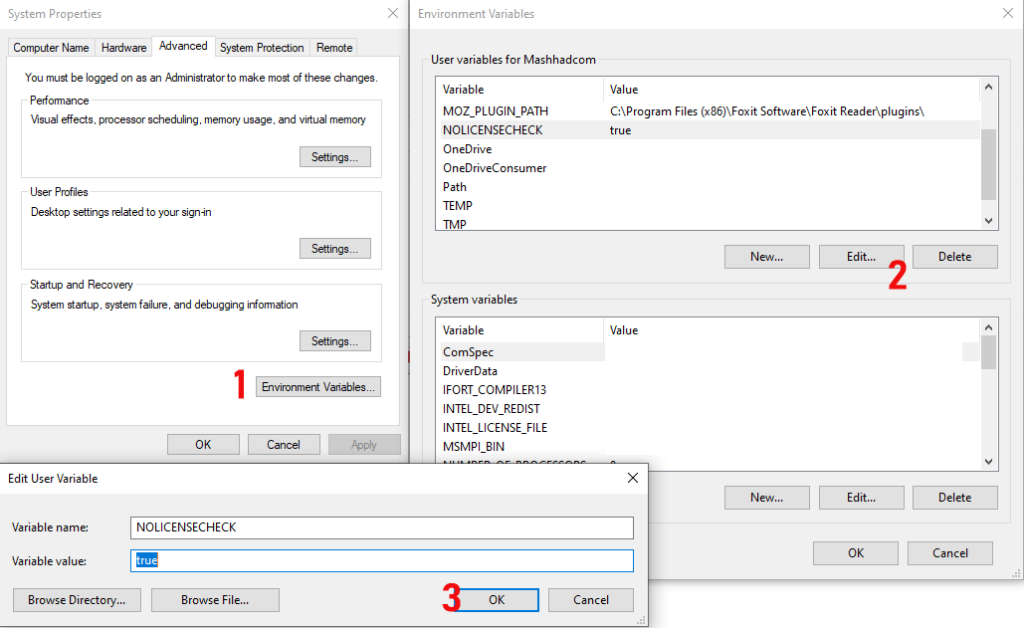
Frequently Asked Questions (FAQs)
What is an Abaqus Flex Net License Server?
The Abaqus Flex Net License Server is a proprietary software application developed by Revenera (formerly Flexera) that manages, allocates, and distributes license tokens for SIMULIA Abaqus products to client machines across a localized network.
How does the Abaqus Flex Net License Server work?
When a user requests to run a simulation, the software queries the Flex Net server. If a license token is available, it is checked out and assigned to the user. If the network exceeds its concurrent user limit, new users are placed in a queue. It also supports “license borrowing,” allowing engineers to temporarily disconnect from the network while traveling.
Can I use one Flex Net Server for multiple Abaqus versions?
Yes. A single, updated Flex Net License Server is backward-compatible and can manage tokens for all installed versions of Abaqus on your network. However, ensure that the version of the Flex Net daemon (lmgrd.exe) is equal to or newer than the newest version of Abaqus you intend to run.
Successfully Installed Abaqus? Take Your Simulations to the Next Level!
Now that your software is running, don’t waste time struggling with convergence errors or missing material data. Explore Banu Musa R&D’s specialized resources for engineers:
Introduction to Abaqus Course: Master the fundamentals of FEA, geometry meshing, and analysis with our comprehensive training package.
Abaqus Material Library (MatLib): Inject over 1,400 ready-to-use, validated material properties directly into your Abaqus/CAE. Stop searching for material parameters.
1-on-1 Mentoring: Need to simulate complex physics like impact, fatigue, or composites? Book a session with our senior simulation experts.
Accelerate Your Engineering Projects with BanuMusa R&D
Struggling with complex simulations, material calibration, or convergence issues? We provide professional solutions to guarantee your R&D success:
- 🚀 FEA & CFD Consultancy: Outsource your toughest structural, thermal, and fluid dynamics challenges to our industry experts.
- 🎓 Technical Abaqus Mentoring: Get 1-on-1 professional guidance to overcome specific modeling bottlenecks and save weeks of trial and error.
- 📚 Abaqus Material Library (MatLib): Skip manual mathematical calibration. Download hundreds of scientifically validated material models instantly.